Talk or type
Say “Hey AIOS” and ask, or type in the prompt box — both count the same. “Stop”, “hold on” and “go on” work mid-sentence.
The AI chief of staff you own.
On your PC, at your word.
AIOS lives on your Windows PC as a small orb. Talk to it or type — it reads you your morning, moves your day around, opens what you need, and hands real work to Claude Code, which plans first and builds only after you say yes. AIOS Cloud keeps the same day in sync on any device with a browser.
Windows desktop app · Early access: 20 people first · Private mode: nothing leaves your PC without your yes
We are opening the Windows app to the first 20 people, then the next 80, so we can fix what anyone trips over in their first week. Leave your email and we will write when your download is ready.
Everything in the demo runs on the PC in front of you. The cheapest certain answer comes first, so much of what you ask never touches an AI model at all.
Say “Hey AIOS” and ask, or type in the prompt box — both count the same. “Stop”, “hold on” and “go on” work mid-sentence.
Say “good morning” and your brief is read out; “start my day” opens your apps, folders and sites. A heads-up comes before each thing on your plan starts.
“Move the shower to 12:30.” “Add an event tomorrow at 3.” “Mark it done.” Each happens on the spot, and “undo that” takes it back.
Real work goes to Claude Code on your own Claude plan. It plans first, changing nothing, and builds only after you approve — every step lit up on the dial as it works.
The Context Constellation draws everything AIOS remembers, with your North Star at the top. What a call is given lights up, so you can see exactly what went where.
Say “go private” and nothing leaves your PC without your yes. Your memory and settings follow you to a new PC through AIOS Cloud.
AIOS Cloud is where your notes, plan and calendar live; the desktop app reads and writes the same day. It works on its own in any browser, your phone included, and it is free to start today.
Fifty seconds, and every screen in it is the real thing. Write on a tablet while you are out, drop a photo in from your phone on the way home, sit down — and it is already one note, already filed.
Every assistant you have tried forgets you the moment you close the tab. You re-explain your life at the start of every conversation, paste your context in by hand, and get back something confident and generic.
AIOS is built the other way around. Your notes are the truth — the plan, the calendar and the daily brief are all views of what you actually wrote. Nothing is invented, nothing is hidden, and every automatic action is written down where you can read it.
Open today's note and type. “Ship the proposal.” “Standup at 9:30am.” No tags, no fields, no format. AIOS reads what you wrote, the way you wrote it.
A line with a time becomes a calendar event. A line under Next Steps becomes a task. Say “every Monday” and it becomes a routine. Instantly, and without spending an AI request.
AIOS ranks the day and tells you why each group sits where it does — what you missed, what you chose, what's next. Tick one off and your note, plan and calendar all agree.
Every procedure that ships inside AIOS is published in full and free to read — no account, no email, no gate. If you want to see how a system like this is documented before you buy one, it is all there.
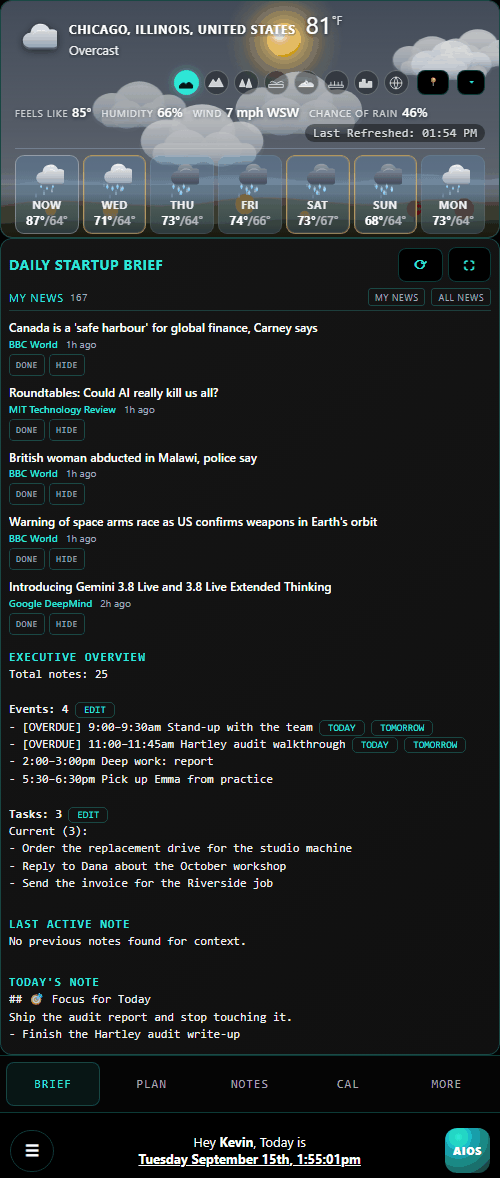
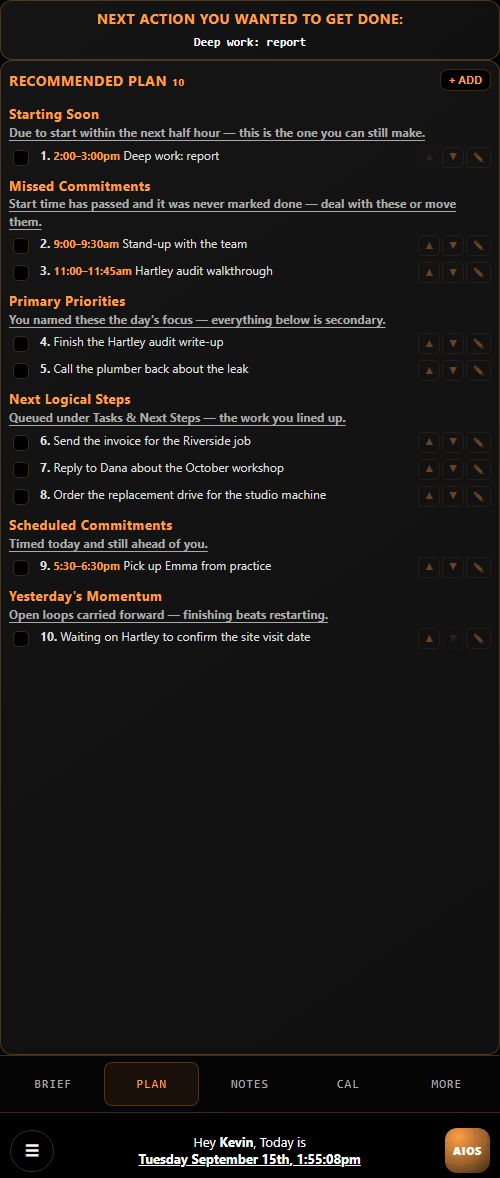
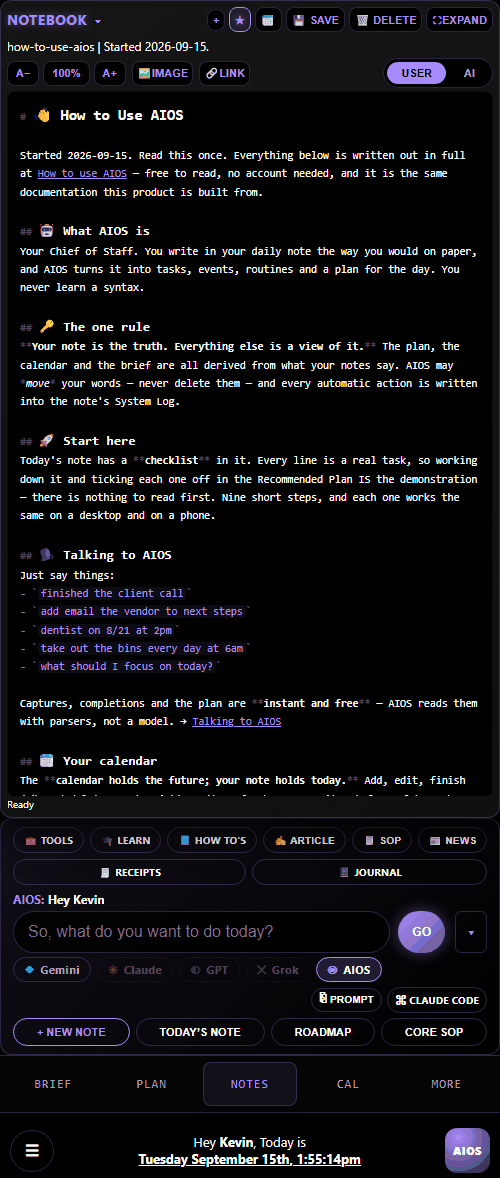
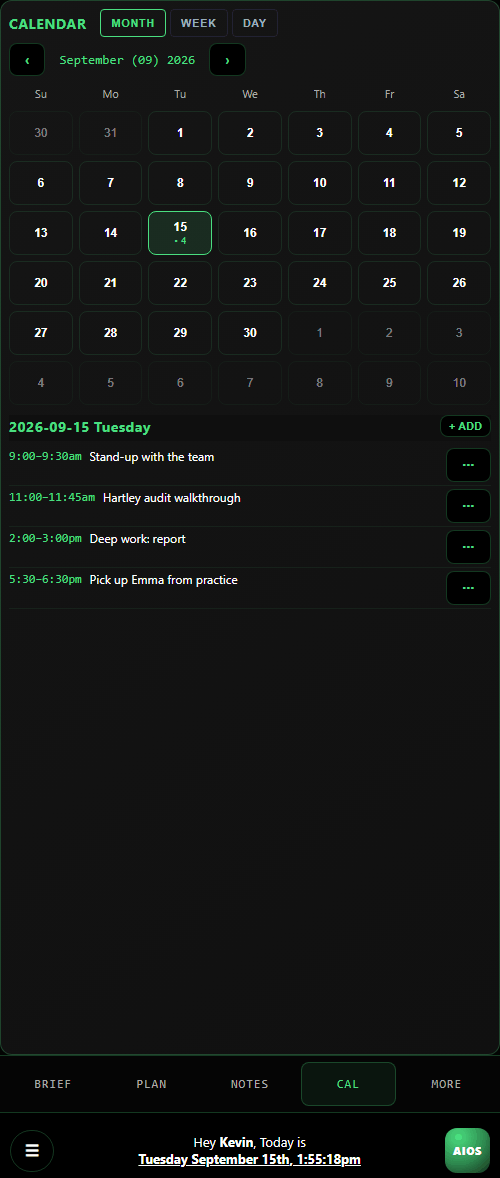
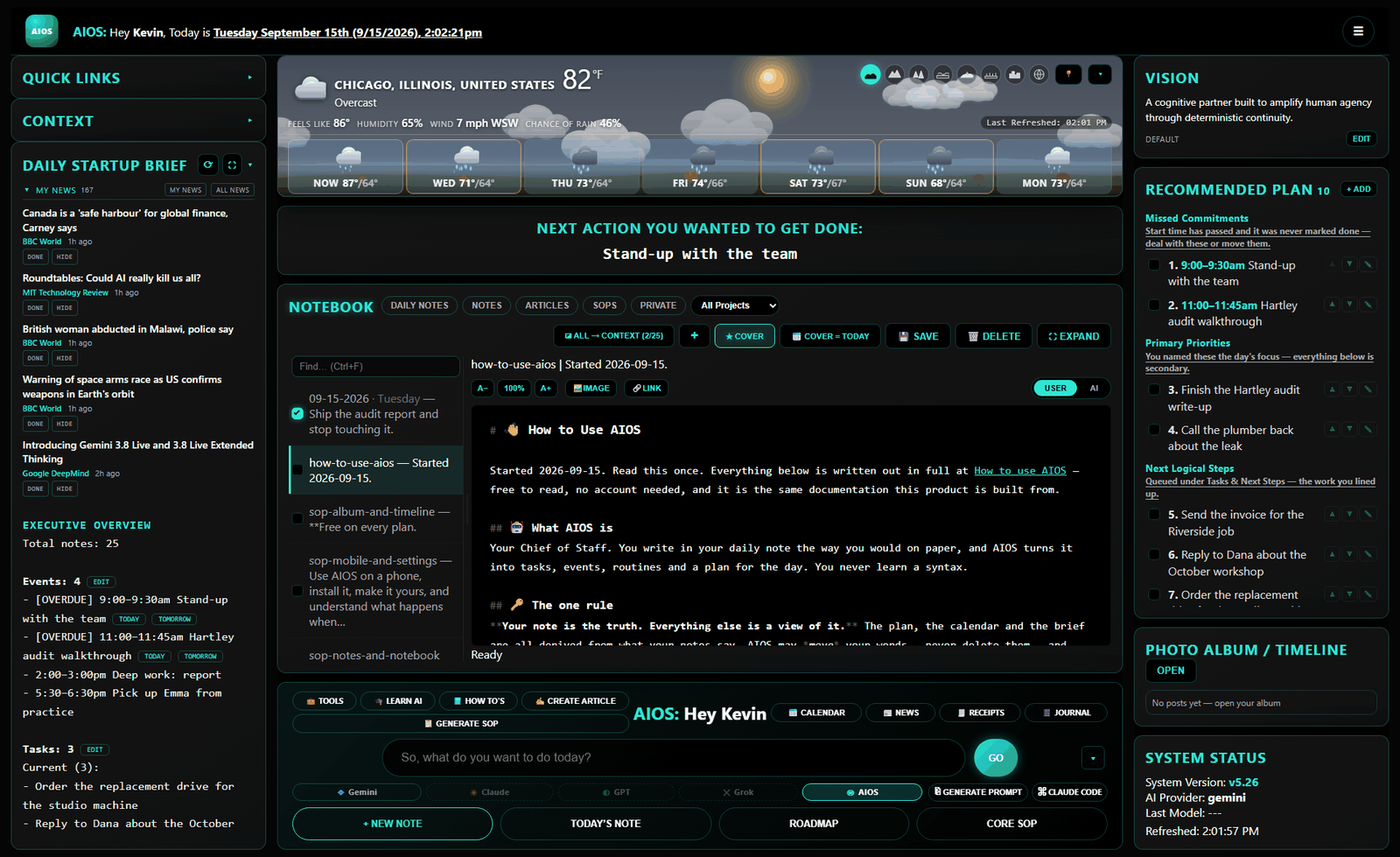
The one rule everything follows, and how a line you type turns into a real task or event.
Capturing, finishing, asking, choosing which model answers — and what to do when it does not understand you.
The Context panel, the USER/AI view, and the private-note firewall. Read it before you trust anything with your notes.
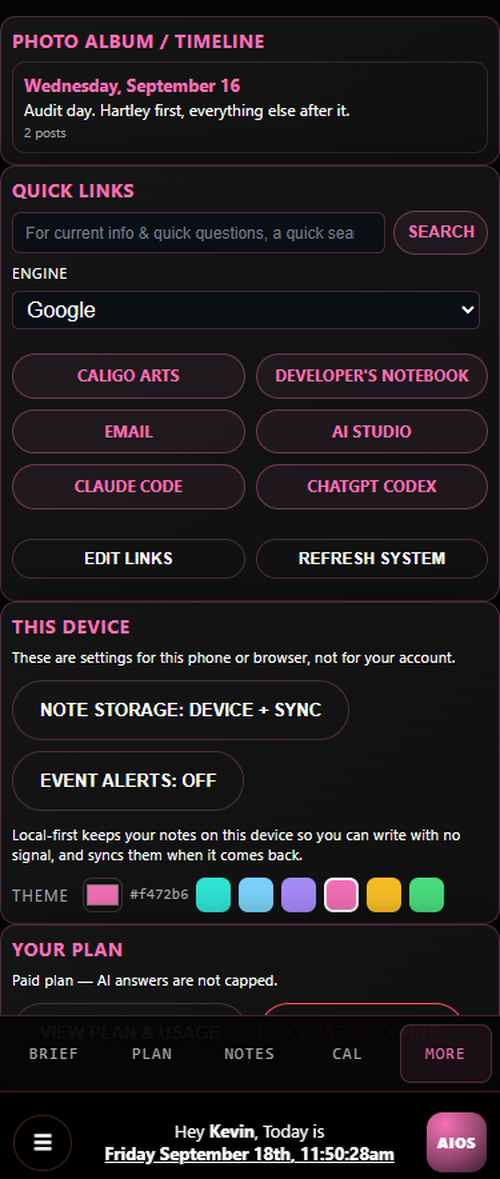
Installing it to a home screen, picking your own accent color, and what happens when two devices disagree.
Ask Claude, GPT, Gemini and Grok the same question at once. They answer independently, then read each other and say plainly what is wrong, out of date or risky — and one of them writes up where the table landed, with a count of who agreed.
No ego, no envy, nobody steering it towards the answer that suits them. Four models with no stake in the outcome, arguing about whether the idea is any good.
Add what you already think and the table holds it to the same standard it holds each other to. It is not there to agree with you.
Tick which of your notes the table may read, and every round is written into your own vault — so the next session picks up where the last one left off instead of meeting you again.
Not a chat window with a to-do list bolted on.
One page per day, created for you, carrying yesterday's unfinished work forward automatically. It is the source of truth — everything else is a view of it.
Every morning AIOS writes the day before up to a Timeline — what you did, what you decided, the photographs you put in the note — and from then on the post is yours to edit. Add to it, re-arrange the pictures, or write one from scratch. It is a photo album and a life journal built out of notes you were writing anyway, and nobody mines it to sell you anything. There is no advertiser on the other side of it, because there is no advertiser.
Your day, ranked and grouped, with a sentence explaining every group. Missed commitments jump to the top. Reorder it and AIOS never re-sorts it behind your back.
Add, change, finish and delete events right where you see them. Future commitments live in the calendar — and drop into that day's note the moment the day arrives. Switch on reminders and AIOS tells you ten minutes before anything timed.
A real briefing every morning: what's scheduled, what's overdue, what's still open, and what AIOS thinks you should do first — with the reasoning shown.
Turn any note into a proper procedure — purpose, steps, how to verify it worked, what to do when it fails. Your procedures stay yours: nothing leaves your vault unless you send it in yourself.
Install it to your home screen. Five real pages, not a squeezed desktop. Edit on your laptop, pick up your phone, and nothing gets silently overwritten.
Before you press send, see the whole turn: every note going in with its own token count, anything dropped to fit shown struck through, which model will answer and what it will cost. It runs the real pipeline, so it cannot flatter you.
AIOS Receipts reads the merchant, the date, the tax and the total off a photo, tells you which figures it had to guess, and files the expense — with the receipt itself in a note in your notebook. Export the ledger as a real Excel workbook or a file Zoho Expense imports. Free to try, then $29 once — you own it — or included in an AIOS plan. It is one of several tools for AIOS.
Memories Journal is one page a day and nothing else — no plan, no calendar, no console. It writes into the same vault as everything else, so a year of journalling opens in AIOS as a year of daily notes and the Timeline reads it. Free to try, then $19 once, or included in an AIOS plan.
AIOS Skills turns learning into a game: every lesson, recipe and goal earns experience, and every skill climbs fifty levels from Novice to Master with a new title at each one. The life skills school never taught come set up with learning paths, and on a plan AIOS writes a path for any skill you name. Everything you log shows up in AIOS as notes. Free to try, then $19 once, or included in an AIOS plan.
Ctrl+F searches every note you have, and the results stay put while you read them. Private stays private — search obeys exactly the same wall as everything else, in both directions.
On a plan, turn any note into an article — export it as your own webpage, or submit it to the Developer’s Notebook, where it is reviewed before anything is published and your name goes on it.
The note-first half of AIOS is free and is not a trial — a journal, a planner, a calendar and a project manager that works on its own, with no expiry and no card. What costs money is the part that calls an AI model, because every question you ask it is a real bill. That part is switched on and you can have it today.
$15 a month, or $144 a year.
The same assistant either way, so the yearly price is simply cheaper per month. A free account is never switched to paid behind your back — you are asked, in words, and you can say no and keep everything you already have. There is no card field anywhere in AIOS: pressing UPGRADE sends you to the payment provider’s own page.
A free account is not a crippled one. The gate is on the model CALL and not on the prompt box — so free still captures, completes, reschedules and reorders from exactly the same box, writes to your note and answers you. What it does not do is answer a question, because that is the part with a bill attached.
AIOS is not built from a roadmap in a drawer. Almost every release for months has come straight out of somebody using it for a real week and saying what went wrong — a phrasing it would not read, a button that did nothing, a reminder that never arrived. That is the whole development process, and it is open to anyone with an account.
Not a test drive. Put your actual week in it — that is the only use that finds anything.
It is in the system bar menu, on every screen. Tell us what broke, what you expected, or what was missing. One sentence is plenty.
It goes on the list and usually ships within days. Whole features exist because one person said a sentence — choosing which model answers, times on the plan, the journal itself.
That is not a suggestion box. The fastest way to get the assistant you want is to tell us what it should have done, and the people who do that are the reason it does what it does now.
In the meantime, the AI knowledge base is free and needs no account: eight short lessons on how these tools actually work, then a track for whatever you do — writing, coding, planning, research, media, admin, or building your own tools.
Open this page on your phone and add it to your home screen — Add to Home Screen in Safari, Install app in Chrome. It gets its own icon and opens full screen with five real pages, not a squeezed desktop. There is nothing to download from a store.
The same address, in any browser. Edit on your laptop, pick your phone up, and carry on — and if the connection drops, AIOS keeps working from the copy on your device and syncs when it comes back.
An app-store release is being prepared for when enough people want one. If you would rather install it from Google Play than from your browser, say so with the feedback button — that is what decides whether it is worth doing.
Everything below is read from one note you wrote in your own words. You choose what the model may see, and you can ask it about the thing in front of you without leaving it.
Most assistants ask you to trust a promise. AIOS is built so the promise is structural — and so you can check it yourself, any time, in one click.
AIOS (pronounced Eye‑oss) is the Augmented Intelligence Operating System. It augments your own intelligence rather than replacing it, so people and the tools they use evolve together toward a better future.
AI has become powerful — but fragmented, stateless, and unsafe. AIOS fixes that. It isn't another app; it's a private, personal, always-on cognitive partner built from first principles.
It levels the playing field by giving everyone access to a personal Chief of Staff to organize thoughts and goals into Recommended Plans suited to their own style. Lack of specialized knowledge is no longer a disadvantage.
Equal access to knowledge, tools, and guidance — tailored to your unique abilities.
A prompt builder that writes good prompts for you. One press that turns a note into a standard operating procedure. Publish it to your own site, or submit it to the community notebook and make somebody else’s Saturday easier. Same product on your phone.
The whole note-first product is free and stays free. The assistant is a plan when you want it, and the three standalone apps come with a fortnight to try. Feedback is what shapes what gets built next — the last several releases came directly out of daily use by real users.
Takes about thirty seconds. We send one email to confirm the address — click the link and your account is open.
Already have an account? Sign in.
We are inviting the waitlist in small groups — the first 20, then the next 80 — so we can fix what people trip over in their first week. Join the waitlist and we will email you when your download is ready. AIOS Cloud is open to everyone now.
No, and that is the point. Write the way you would on paper. AIOS widens its reading to match how people actually type — if it ever fails to understand a natural phrasing, that is treated as a bug in AIOS, not a mistake by you.
You get one email asking you to confirm the address. Click the link and your account is open — you can sign in straight away, and AIOS walks you through your first day. Confirming is what proves the address is really yours, which is why it is the step that opens the account rather than a formality afterwards. If the email does not arrive, check your spam folder before enrolling again.
They never enter the AI pipeline at all. They are excluded at the single point every file read goes through, they are never listed by default, and while one is open the AI input is switched off. You can verify what is actually sent for any note with the USER/AI toggle.
Both. Open this page on your phone and add it to your home screen — it installs as an app with five full pages and its own icon, with nothing to fetch from a store. By default your notes are kept on the device as well as the server, so AIOS opens and keeps working with no connection at all and syncs the moment one comes back. Anything AIOS worked out on the server — your plan, your brief — is shown with the time it was worked out, so you always know whether you are looking at something current.
Nothing is silently overwritten. AIOS tracks which version your editor is based on, refuses a save built on a stale one, and asks you which version to keep. Your unsaved text stays exactly where you typed it while you decide.
No. Every note is a plain Markdown file in your own vault. The tasks, events and plan are indexes built from those files — if they ever disagreed with your note, the note wins.
The note-first product — notes, plan, brief, calendar, routines, projects, search, the phone app — is free, and it is not a trial. The assistant is $15 a month or $144 a year, because every question you ask it is a real model call that costs real money; a plan also includes AIOS Receipts, Memories Journal and AIOS Skills. Those three can be bought outright instead — $29, $19 and $19, once each, and you own them whatever happens to your plan. See every tool. No card is taken at signup and nothing switches to paid behind your back.
Whichever you like. AIOS picks a sensible one by default and you can override it per question — press a model button under the prompt box, or just start your sentence with Hey Claude, Hey Gemini, Hey GPT or Hey Grok. The answer says underneath it which one replied, and that line is written into your note as well, so “which of them told me that?” is still answerable next week.
Open YOUR PLAN in the system bar — or More → Your Plan on a phone — and press UPGRADE MONTHLY or UPGRADE YEARLY. You are sent to the payment provider’s own page, and your plan updates within a few seconds of paying. There is no waiting list and nobody has to approve you.
It is being prepared for one, and whether it ships depends on whether enough people want it. In the meantime installing it from your browser gives you the same app, the same icon and the same offline behavior, and it updates itself without you doing anything.
Say it once. Let AIOS run the day.
Running a business rather than a week? I fit AIOS to how your company already works — documented procedures, your calendar and tools connected, hosted or on your own hardware.